Opening Range
30bb Small Blind Opening Range — Tournament RFI Strategy
BeyondGTO solver database · MTT Chip-EV · 8-handed · 30bb effective · updated Aug 27, 2026 · method · save this chart as a PNG
Drill the 30bb Small Blind range, or solve what comes next
Every opening decision at 30bb Small Blind, dealt hand by hand and graded against this chart. Or take the range to a flop: pick your sizes and solve the postflop yourself.
25 graded hands a day on the free plan
3 solves a day on the free plan, your own sizes
Free account · no credit card · nothing to cancel. What's free →
How to play 30bb from the Small Blind
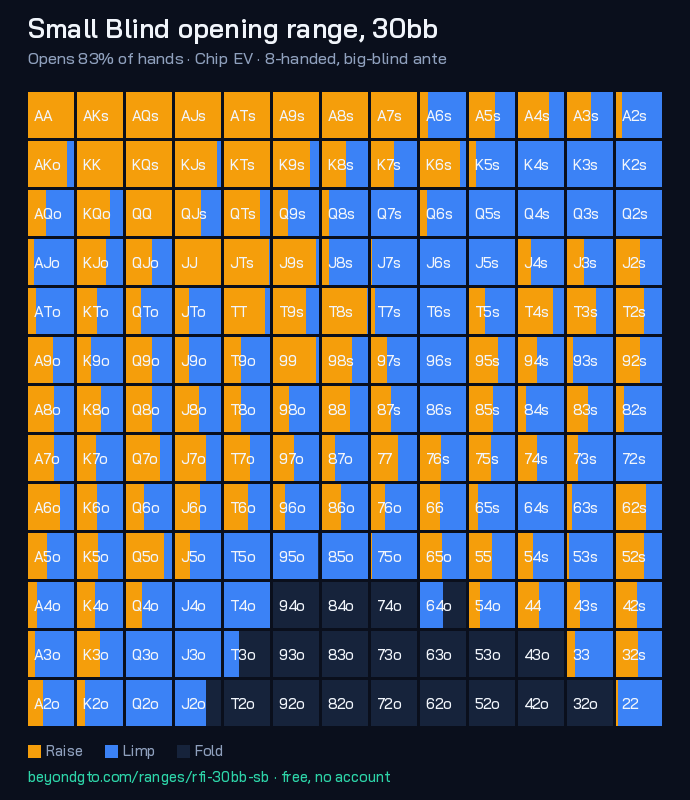
This is a first-in spot: everyone folds to you in the Small Blind, and you're deciding whether to commit at 30 big blinds. The solver opens about 83% of hands here. The tighter the position, the fewer hands clear the bar to commit your stack — every hand you jam has to show a profit against the calling ranges left to act behind you.
At this depth the solver keeps a raise size in the mix, so the strongest hands don't simply jam — AA min-raises about 100%. That's the key difference from a true push/fold spot: with more chips behind, min-raising lets you keep dominated hands in and play a postflop pot in position.
Read the grid left-to-right within each cell: teal is the jam frequency, amber a min-raise, blue a limp, and the dark fill is fold. A fully teal square is a pure shove; a split square is a mixed frequency the solver plays some percentage of the time. Drill the borderline hands — those are where most of the EV is won or lost.
In Discord
Get this range without leaving your chat.
Type /range position:SB stack:30
and the solver answers in the channel.
Installs to your account, so the commands work in every server you are already in — no admin approval needed. See all four commands.
Get the complete preflop range pack (PDF)
Join thousands of players getting weekly GTO insights, strategy breakdowns, and training tips straight to their inbox. Free forever.
No spam, ever. Unsubscribe anytime.
You're in!
Download the chart pack (PDF)Your download is ready above. We'll also send the occasional solver insight — unsubscribe anytime.